
Automatic Generation of rigid bodies using Weld Constraints in SAP2000
In finite element structural models in SAP2000, Body Constraints are used to rigidly connect a selected set of joints, ensuring that their chosen degrees of freedom (translations and/or rotations) remain rigidly linked, thereby maintaining a fixed kinematic relationship among them as if physically connected. SAP2000 provides an efficient and convenient way to create multiple Body Constraints automatically using a single Weld constraint property, avoiding repetitive manual definition of each individual constraint.
This article covers the fundamental concepts of Body Constraints, demonstrates how using Weld constraints significantly simplifies their creation, and includes practical examples taken from Structural Academy’s Advanced SAP2000 Course.
Body Constraints: Basic Concept
Briefly, a Body Constraint groups two or more joints together, ensuring they rigidly move as a unit within selected degrees of freedom (translations and/or rotations). They are frequently used to:
- Model rigid connections between different element types (frame-to-frame, frame-to-shell, frame-to-solid, or shell-to-solid) typically located at convergence zones or overlaps.
- Connect structurally distinct parts of a model, enforcing their kinematic unity.
- Impose rigid-body behavior in specific areas of the structure, reducing unwanted local deformations.
In practice, it is essential to define and assign a specific Body Constraint to each set of joints that needs rigid behavior. One must avoid inadvertently reusing a single Body Constraint on separate groups, as this would mistakenly impose rigidity between unrelated groups of joints. Hence, each independent rigid body should have its own unique Body Constraint defined.
Weld Constraints and Automatic Creation of Body Constraints
A Weld Constraint can automatically generate multiple internal Body Constraints in SAP2000. When assigning a Weld constraint to a group of joints, the user defines:
- The degrees of freedom (translations and/or rotations) to constrain.
- A tolerance distance that determines which nearby joints will be grouped into each Body Constraint.
During analysis model generation, SAP2000 verifies distances between the joints that share the same Weld constraint, automatically grouping them into separate Body Constraints, provided that their relative distances are equal or smaller than the defined tolerance.
Advantages of Weld Constraints
- Efficiency: Only one Weld constraint assignment generates multiple Body Constraints automatically.
- Spatial Control: Clear definition of the maximum allowable joint grouping distance.
- Flexibility: SAP2000 automatically reorganizes the joint grouping based on the predefined tolerance upon geometric modifications.
Demonstration Video
The following demonstration video presents a practical example of using Weld constraints to automatically generate hundreds of Body Constraints. It clearly illustrates how this function optimizes modeling time, reduces potential errors, and enhances structural analysis efficiency.
Additional Practical Examples
Automatic Generation of Multiple Body Constraints
In the Advanced SAP2000 course, Exercise 4 demonstrates the creation of multiple Body Constraints by defining only one Weld constraint (and specified tolerance). The process is straightforward:
- Assign a single Weld constraint (e.g., ”WELD1”) to a set of joints.
- Define the grouping distance tolerance.
- SAP2000 automatically clusters joints lying within the specified distance into separate Body Constraints.

Modeling Hinges in Floor Slabs
Exercise 13 of the Advanced SAP2000 course shows how to create a slab hinge that releases bending moments between adjacent slab panels while preserving continuity only in translational directions. The process includes:
1. Full Joint Disconnection (Disconnect)
- Select joints along the intended joint line and execute the “Disconnect” command.
- Each intersection point of 4 elements produces 4 independent joints, completely breaking continuity along that line.

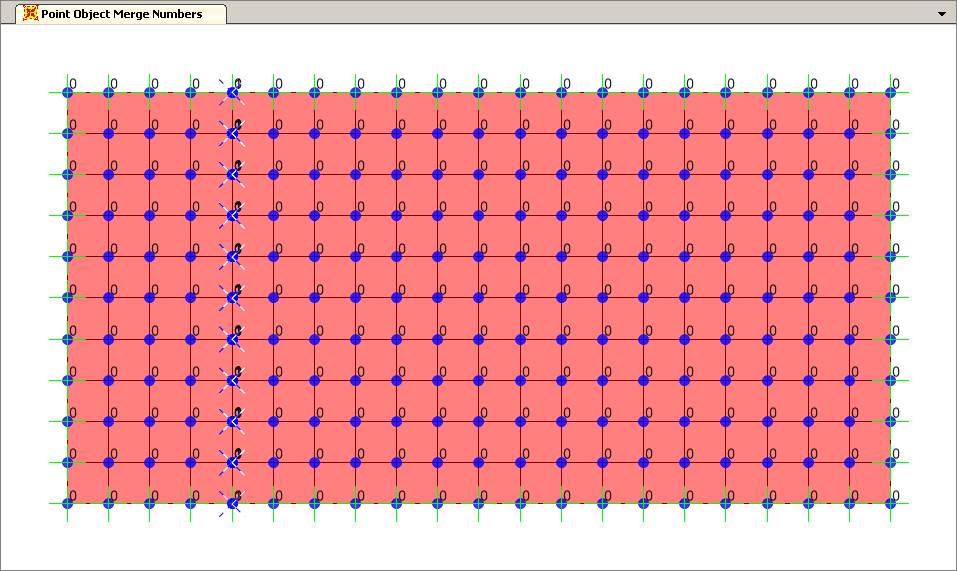
2. Internal Fusion of Joints per Panel (Merge)
- To reconnect joints internally within each separate panel, distinct merge numbers must be assigned per side.
- Next, execute the “Merge Joints” command. Joint merging occurs only among joints sharing the same merge number, effectively disconnecting the two sides.
3. Hinge Without Compatibility
- At this point, the slab hinge line remains fully open, not transmitting forces or even translations.

4. Weld Constraint for Translational Compatibility
- Finally, assign a Weld constraint to the coincident slab edge joints, selecting only translational degrees of freedom (U1, U2, U3). Thus, the slab panels transmit translation movements only, effectively freeing rotations (no moment transfer).
- Since these joints coincide spatially, an infinitesimally small Weld tolerance suffices for SAP2000’s automatic grouping into separate Body Constraints without rotational constraints.


This approach ensures translational continuity but prevents flexural moment transfer between the slab panels, effectively modeling a rotational release.
Conclusion
The Weld constraint property in SAP2000 provides a powerful and productive approach to automatically generate multiple Body Constraints. Instead of manually defining each Body Constraint individually, only a single Weld constraint (with specified degrees of freedom and tolerance) is required, and SAP2000 takes care of all subsequent constraint creations. This method significantly improves modeling productivity, facilitates managing rigid joint behaviors, simplifies partial connection releases, and is highly practical when ensuring rigid-body behavior among groups of joints in structural analyses.
 Weld_example.$2k