
Moving Loads vs Multi-Step Static in CSiBridge and SAP2000
When modelling vehicles loads on bridges in CSiBridge and SAP2000, engineers typically choose between:
- Moving Load Cases (influencelinebased moving traffic cases that linearly superpose axle loads and then report maximum and minimum responses), and
- Multi-Step Static load cases using Vehicle Live patterns.
Both approaches can represent vehicles that may or may not act simultaneously, but they make different assumptions about how loads are positioned and combined, and about how code traffic models are represented. This distinction is crucial when superposing vehicles that might act together or act as alternatives.
Moving Load Cases
In Moving Load Cases:
- You define lanes, vehicles, and vehicle classes according to the design code or project requirements.
- CSiBridge computes influence lines/surfaces and automatically moves the vehicles along lanes to find maximum and minimum responses.
Key points:
- At each trial position of the vehicles (and lane usage configuration), all active loads (axles, lanes, multiple vehicles) are linearly superposed.
- Over all these static solutions, the Moving Load Case then retains, for each response quantity, a maximum and a minimum.
- The maximum axial force, maximum shear, maximum bending moment, etc., may occur at different vehicle positions, so they do not generally correspond to one unique physical configuration.
MovingLoad Load Cases should not normally be added together, in order to avoid multiple loading of the lanes, and that additive combinations of Moving Loads should only be defined within the MovingLoad Load Case itself. Multiple Moving Loads may be combined together only in envelope-type combinations, where they are not added.
In practice:
- Alternative traffic models (different code vehicles, trains, permit trucks) should be combined via Envelope-type load combinations, not algebraic sums.
- Simultaneous vehicles in several lanes should be modeled within a single Moving Load Case, using vehicle classes, lane definitions and multilane factors, so that the linear superposition of axle effects happens consistently inside that case.
For Moving load case, you can check the Moving Loads in SAP2000 and A Guide to Moving Load Analysis in CSiBridge articles.
Multi-Step Static with Vehicle Live
In Multi-Step Static load cases:
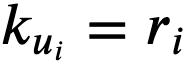
is solved for each step i, where ri is the load state at that step.
With Vehicle Live patterns:
- Vehicles, lanes, and kinematics (start position, speed, direction) are defined.
- At each step, CSiBridge places axle loads at their current positions and solves the structure statically.
- All forces and displacements at step i correspond to one physically consistent configuration of all vehicles.
This is ideal when:
- You want stepbystep evolution of response as vehicles cross.
- You need fully correlated internal forces at specific configurations (for nonlinear checks, staged construction interaction, etc.).
- You want to study explicit scenarios (e.g., one permit truck meeting another truck on the bridge).
Envelopes are then taken over the steps of the same Multi-Step Static case, representing the governing effects of that specific scenario, not an abstract influenceline envelope over all possible positions.
Two Important Limitations of Multi-Step Static Vehicle Live
No distributed lane loads
For Vehicle Live patterns used in Multi-Step Static loading, only axle loads are considered;
Essential practical consequence:
- Use Moving Load Cases with full lane definitions (axles + distributed lane loads) to produce codecompliant global envelopes (ULS, SLS).
- Use Multi-Step Static Vehicle Live mainly as a complementary scenario tool.
- If you need a rough representation of lane UDL inside a Multi-Step Static case, you can keep a separate static laneUDL pattern active in all steps, superposed with the moving axles. This is valid for single span bridge. For multi-span, uniform UDL always on all spans does not reproduce the critical alternating patterns (e.g. loaded span – unloaded span – loaded span) that many codes identify as worstcase.
Velocity does not create dynamics
Even though the Vehicle Live definition for Multi-Step Static requires speed and a time step, a Multi-Step Static load case remains purely static:
- Speed is used only to compute vehicle position per step.
- Each step is solved as with no mass or damping terms, dynamic effects are not included.
Essential practical consequence:
- Multi-Step Static Vehicle Live gives you quasistatic snapshots, not a dynamic response.
- Dynamic behavior must be covered either by:
- applying code impact/dynamic factors to the static results, or
- using a true timehistory load case based on the same Vehicle Live definition.
Worked Example – Two Lanes, One Vehicle per Lane on a 40 m Simply Supported Bridge (CSiBridge)
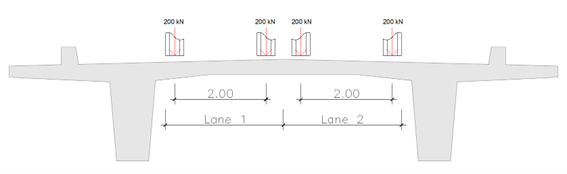
Geometry and vehicle
- Bridge: simply supported, span L = 40 m.
- Only positive bending moments in the span.
- Two parallel lanes defined along the span.
- Each lane has one identical vehicle:
- 2 axles of 400 kN (200 kN + 200 kN) each,
- Axle spacing 3 m,
- Axles aligned along the lane.
We look at the maximum positive midspan moment.
One lane – one twoaxle vehicle
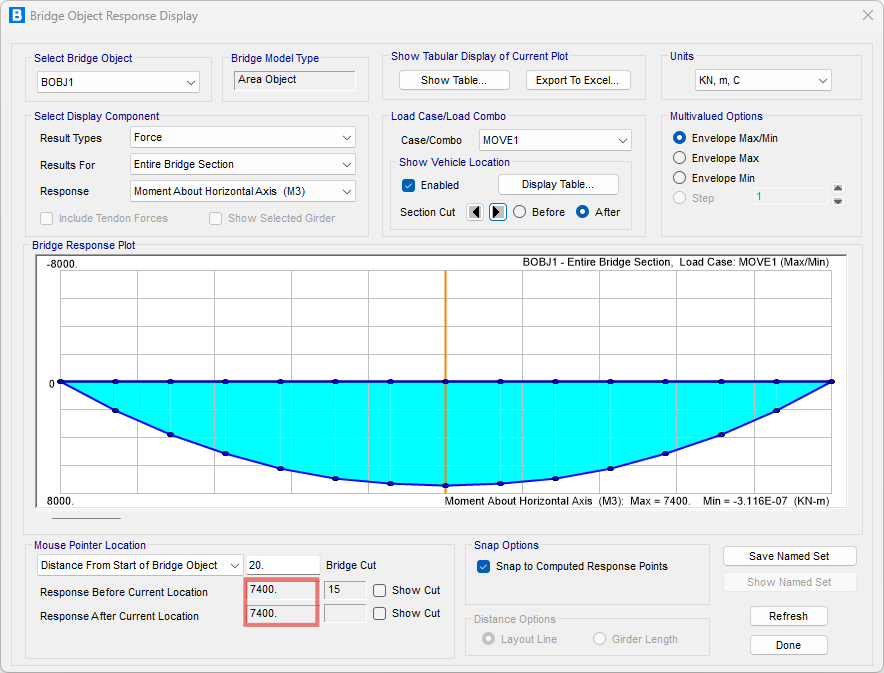
For one lane with a twoaxle vehicle 400 kN axles, 3 m apart, positioned by CSiBridge to maximize midspan moment on a simply supported 40 m span, calculation shows:

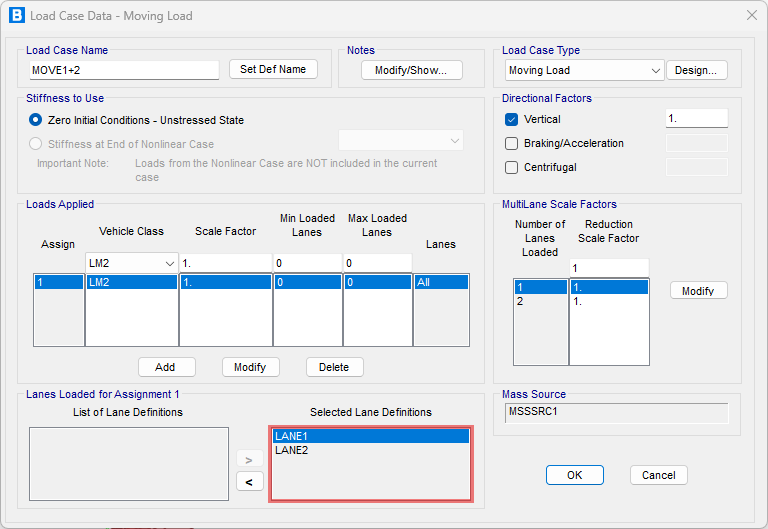
First for Moving Load:
Now for Multi-Step Static:


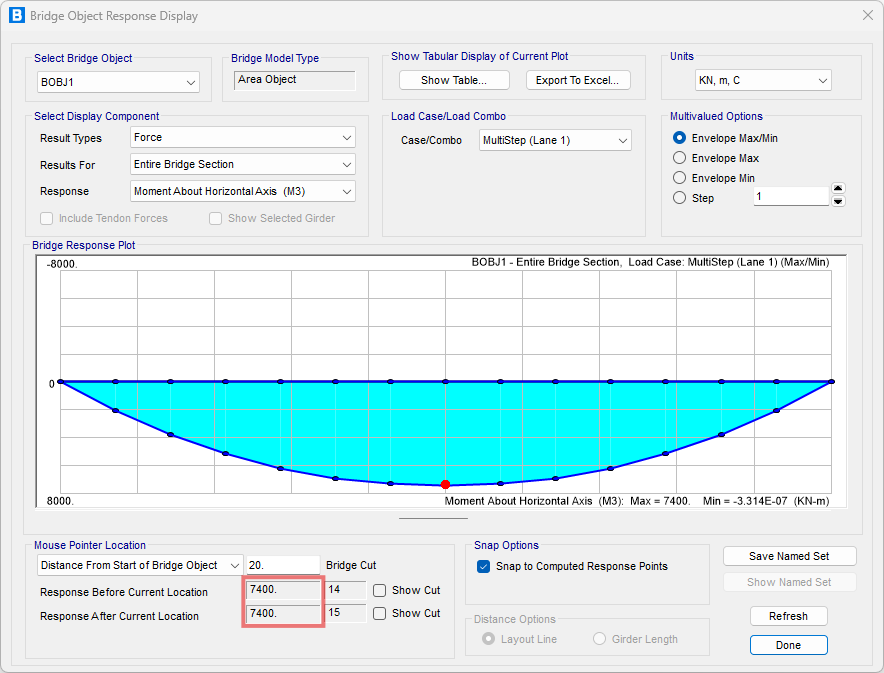
This accounts for:
- Each 400 kN axle acts near the span center,
- Their 3 m spacing around midspan, and
- Linear superposition of both axles.
Two lanes – one vehicle per lane, acting simultaneously
Now consider two lanes, each with the same vehicle in the same longitudinal position (two vehicles side by side near midspan):
- Lane 1:

- Lane 2:

First for Moving Load Case:

Now for Multi-Step Static:


If the main design accounts for both lanes together, the total positive midspan moment for one vehicle per lane acting simultaneously is approximately:

Practical Recommendations for CSiBridge
- Use Moving Load Cases for codecompliant envelopes, including distributed lane loads and multilane factors; combine different traffic models with Envelope-type combinations, and avoid additive sums of multiple Moving Load Cases on the same lanes.
- Use Multi-Step Static with Vehicle Live for explicit scenarios and stepbystep response, being aware that:
- distributed lane loads are not included, and
- dynamic effects are not captured, despite the velocity input.
- For vehicles that act simultaneously, define them together in one Moving Load Case or one Multi-Step Static load case; for alternative scenarios, use Envelope-type combinations instead of additive ones.