
Load Optimizer - Load Iterations Made Easier
The CSiLoadOptimizer is an invaluable tool within CSI Software, specifically designed for structural engineers working with SAP2000 as well as CSiBridge. This tool enables the determination of an optimal set of loads to achieve specified structural goals, including critical applications like cable tensioning. It is versatile, capable of operating with loads applied in any static load case, whether linear, nonlinear, or staged-construction.
Overview of CSiLoadOptimizer Capabilities
The primary function of CSiLoadOptimizer is to determine the scale factors of variable loads within a static load case to best meet defined goals. These goals are specified as target values for various response quantities, such as:
- Joint displacements or reactions
- Member forces or moments (e.g., frame, link)
- Cable tension or tendon tension
- Generalized displacements
- Bridge superstructure forces and moments (CSiBridge only)
The tool supports optimization of any load type that can be applied in a static load case, including gravity, acceleration, force, strain, temperature, displacement, and prestress. However, it is not recommended to use target-force loads as they may conflict with the optimization process.
Understanding Problem Classes
CSiLoadOptimizer categorizes problems based on the relationship between the number of variable loads (NV) and the number of goals (NG):
- Optimization Problem (NV > NG): In this scenario, multiple solutions may exist, and the tool employs an optimization algorithm to find the best one. Each variable load is assigned a cost, which is then minimized using the sum of the squares as the objective function. For optimization problems, you can also specify limits, which are similar to goals but are defined as inequalities, whereas goals are equalities.
- Determinate Problem (NV = NG): This class has a unique, single solution that precisely achieves the specified goals.
- Best-Fit Problem (NV < NG): When there isn't an exact solution that meets all goals, CSiLoadOptimizer seeks a least-squares fit. Each goal is assigned a "benefit," and the solution minimizes the error, with the error for each goal weighted by its assigned benefit.
How CSiLoadOptimizer Works
To utilize CSiLoadOptimizer, a structured procedure is followed:
- Define a Template Static Load Case: This load case serves as the blueprint for the loads to be optimized. You apply each of your variable load patterns within this template. For linear cases, the initial scale factors for these variable loads are arbitrary. For nonlinear cases, choosing scale factors close to the expected optimal solution can significantly improve convergence. Other non-variable loads can also be included in this template.
- Specify Variable Loads: After starting CSiLoadOptimizer from the "Tools" menu, you select which load patterns from your template load case will be "variable" (i.e., optimized) and which will remain "fixed". You can also assign a relative cost to each variable load for optimization problems, influencing their final scale factors.
- Define Goals and Limits: For each desired response, you define its type (e.g., joint displacement, frame force), location, component, and the target value. For best-fit problems, you can assign a relative benefit to each goal to weight their importance. For nonlinear problems, you set absolute convergence tolerances for goals.
- Run the Optimization: When you run the optimizer, a copy of your template load case is created. The tool then perturbs each variable load pattern individually and performs separate analyses to measure the incremental changes in the goals. This process forms an influence matrix. Based on this matrix, the tool solves for the optimal scale factors. For nonlinear problems, this process is iterative, continuing until convergence is achieved or the maximum iteration limit is reached.
The output includes the modified load case in your SAP2000 or CSiBridge model, along with a log file and a summary report. It's crucial to select variable loads and goals that are relevant and independent to ensure a reasonable solution can be found.
Exercise: Using the SAP2000 CSiLoadOptimizer for Cable Lifting Operations
This exercise demonstrates how to use the CSiLoadOptimizer tool in SAP2000 to simulate the lifting of a structure with four cables. The process involves optimizing the shortening applied to the cables to achieve a specific structural response.

Procedure
- Define Variable Load Pattern: For the cables, create a load pattern and apply a negative strain (for instance, -0.01) to simulate shortening. This load pattern will serve as the variable load in the optimization process.
- Launch CSiLoadOptimizer: Open the CSiLoadOptimizer tool from the "Tools" menu.
- Configure the Load Case: In the optimizer, select your "Lift" load case. Designate the load pattern you created in step 1 as "Variable." Any other load patterns involved in the analysis should be set to "Fixed."
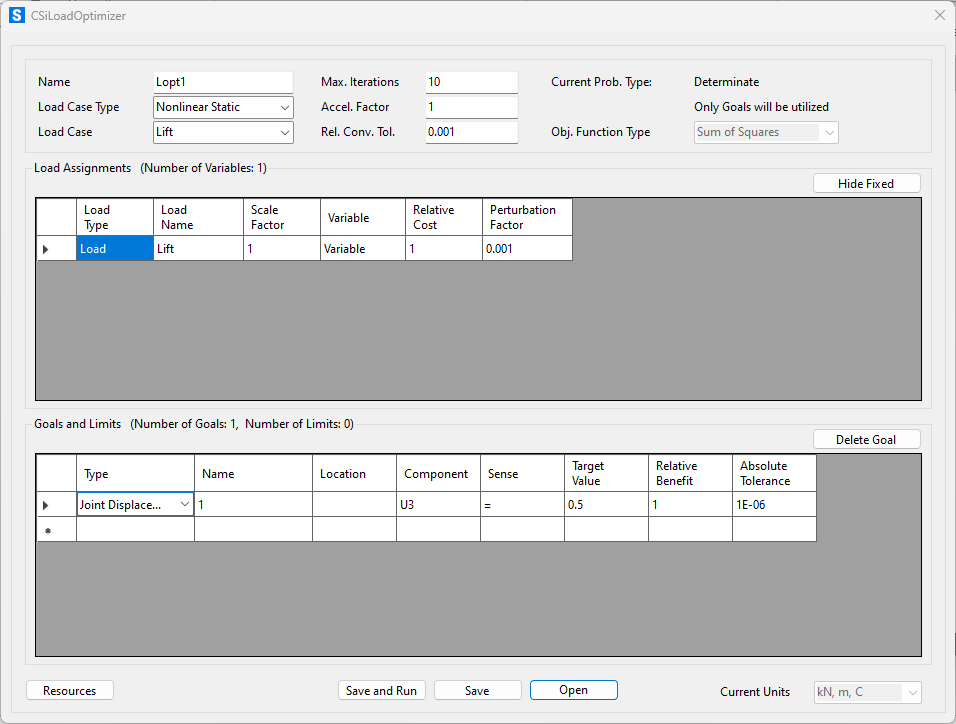
- Set Goals and Limits: Define your optimization targets. For this exercise, specify a "Target Value" for the U3 Displacement (vertical displacement) of 0.5 meters. Based on your inputs, the tool will .
- Save and Run.
- CSiLoadOptimizer will then generate a new load case (e.g., "Lift_Lopt1") containing the optimized scale factor required to meet the specified goals. In this particular case, we will need to shorten the cables 0.023723 m/m to lift the container 0.5m.

For more advanced examples and in-depth case studies, please refer to the SAP2000 Advanced Course (Chapter 4.1).
Attachments
 Modelo.zip