
What is a Section Cut?
A section cut is a feature in structural analysis software that allows engineers to calculate the resultant forces and moments across a specific plane or surface within a structure. Think of it as making a virtual slice through your model to understand the internal forces at that specific location. These forces include shear, bending moments, and axial forces. This is particularly useful for a variety of applications, such as calculating story shears, understanding forces in shear walls, and analyzing connecting forces between different parts of a structure.
Section cuts can be of any shape and can be used for both analysis and design purposes. You can define them before or after running an analysis, but it is generally recommended to define them after the analysis, and any manual meshing is complete.
How to Use Section Cuts in CSI Software
Here's a general step-by-step guide on how to define and use section cuts in CSI software. While the specifics might vary slightly between SAP2000, ETABS, and CSiBridge, the general workflow is similar.
- Define a Group: First, you need to define a group of elements that the section cut will pass through. You can do this by selecting the relevant frame, shell, and link objects and assigning them to a new group. Crucially, the joints where these elements connect must also be included in the group. For example, to report the stresses at the base of a core wall, you would create a group containing the shell elements of the wall and all the joints at its base.

- Define the Section Cut:
- Navigate to the "Define" menu and select "Section Cuts".
- You can then add a new section cut, which will open a dialog box with several options.
- You'll need to give the section cut a name and choose the coordinate system.
- You can define the section cut using the group you created earlier or by defining a quadrilateral cutting plane.
-
Specify Result Types: You can choose to get results for analysis or design. The options for local axes orientation will change depending on your selection. You can check SAP2000 Advanced Course to know more about.
-
Define the Location for Results: You can either use the default location, which is the average of the coordinates of all the points in the group, or you can define a specific point by entering its coordinates.
- View the Results: After running the analysis, you can view the section cut forces in the display tables.
Practical Applications of Section Cuts
Section cuts are a versatile tool with a wide range of practical applications in structural engineering. Here are a few examples:
- Shear Wall Design: Section cuts are essential for designing shear walls, allowing engineers to determine the design forces and moments at different levels of the wall.
- Slab-Beam Interaction: Section cut can be used to obtain the resultant forces on slab-beam system (Shell-Frame)
- Story Shear Calculation: Section cuts can be used to compute the total shear force at a particular story level in a building, which is crucial for seismic design.
- Diaphragm Analysis: Section cuts are used in diaphragm analysis to understand how forces are distributed across the floor or roof slab.
Additional Tools and Resources
For more advanced applications, there are also plugins and external tools that work with CSI software. For example, the "Section Cutter" is a plugin for SAP2000 and CSiBridge that helps with the definition of wall section cuts.
Practical Example
In this example, consider a reinforced-concrete building with columns and a core wall. Our objective is to determine the base shear resisted by the core Wall and columns under a lateral load.
First, select the finite elements and nodes at the elevation where you intend to extract the resultant forces. Once these elements are assigned to a group, create a section cut associated with that group to compute the force resultants across the cut.
.png)
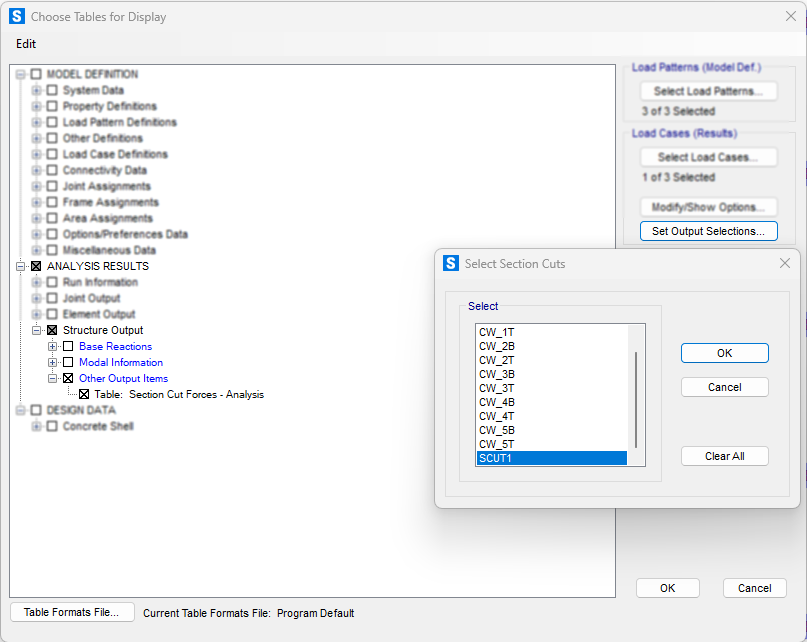
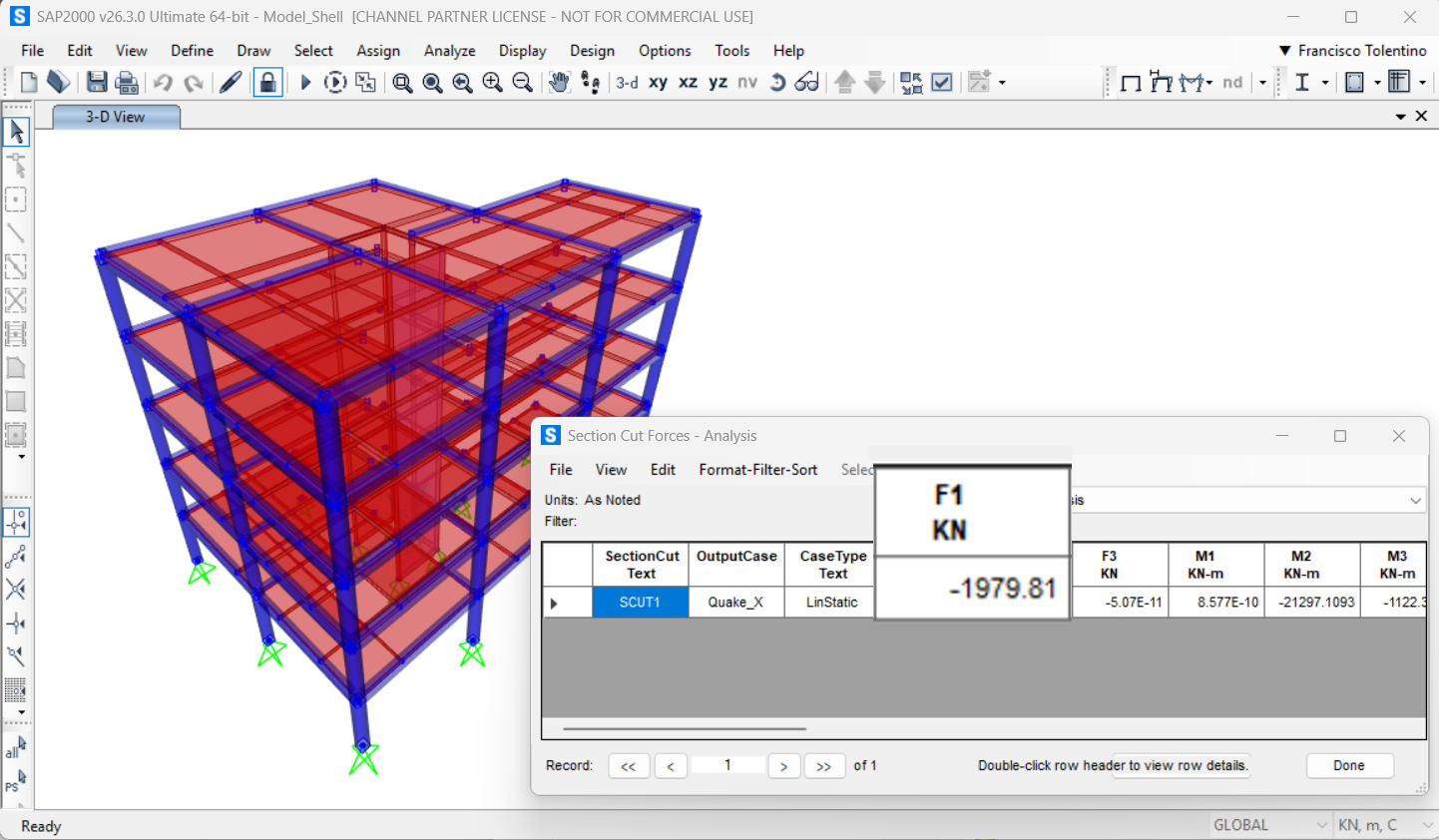
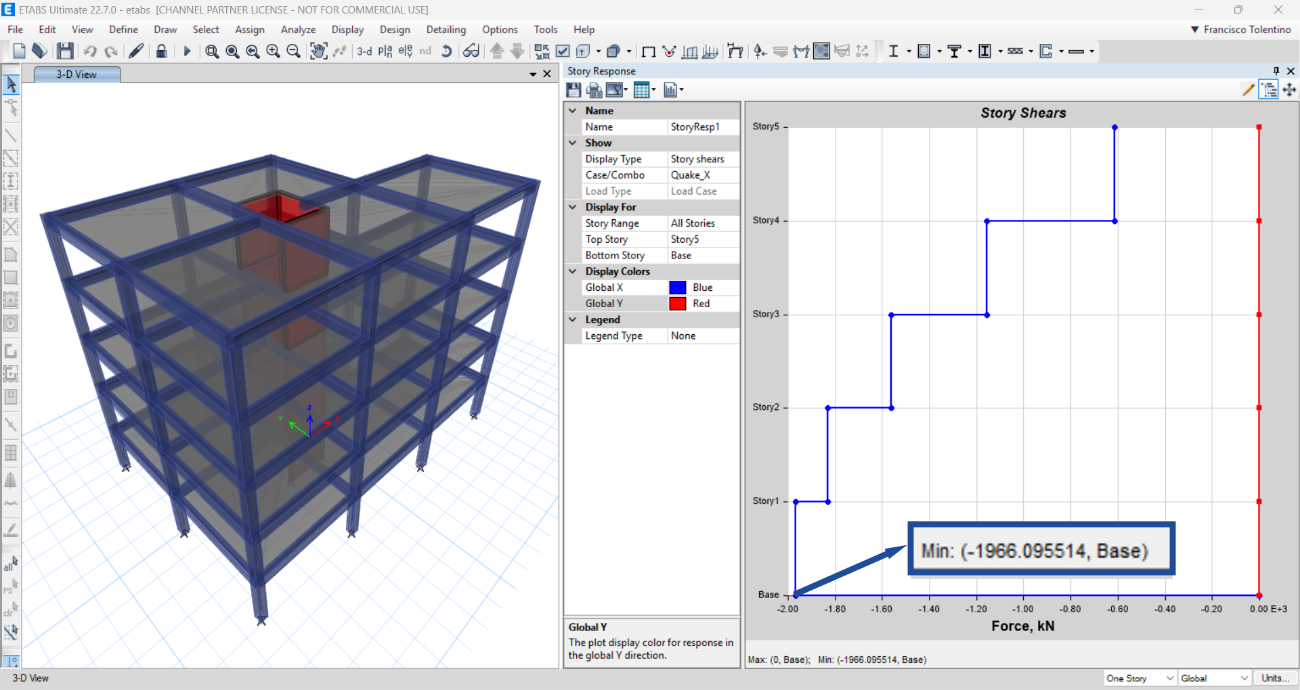
For comparison purposes, ETABS’s Story Response tool performs an analogous operation by automatically generating story-level section cuts for all stories in the model. The agreement between the results confirms consistency across both software.
Next, we’ll extract the bending moment diagram for the core wall. In SAP2000, this requires creating multiple section cuts along the height of the wall. Alternatively, you can use the VIS Section Cutter tool to automatically generate all required section cuts with a single click.

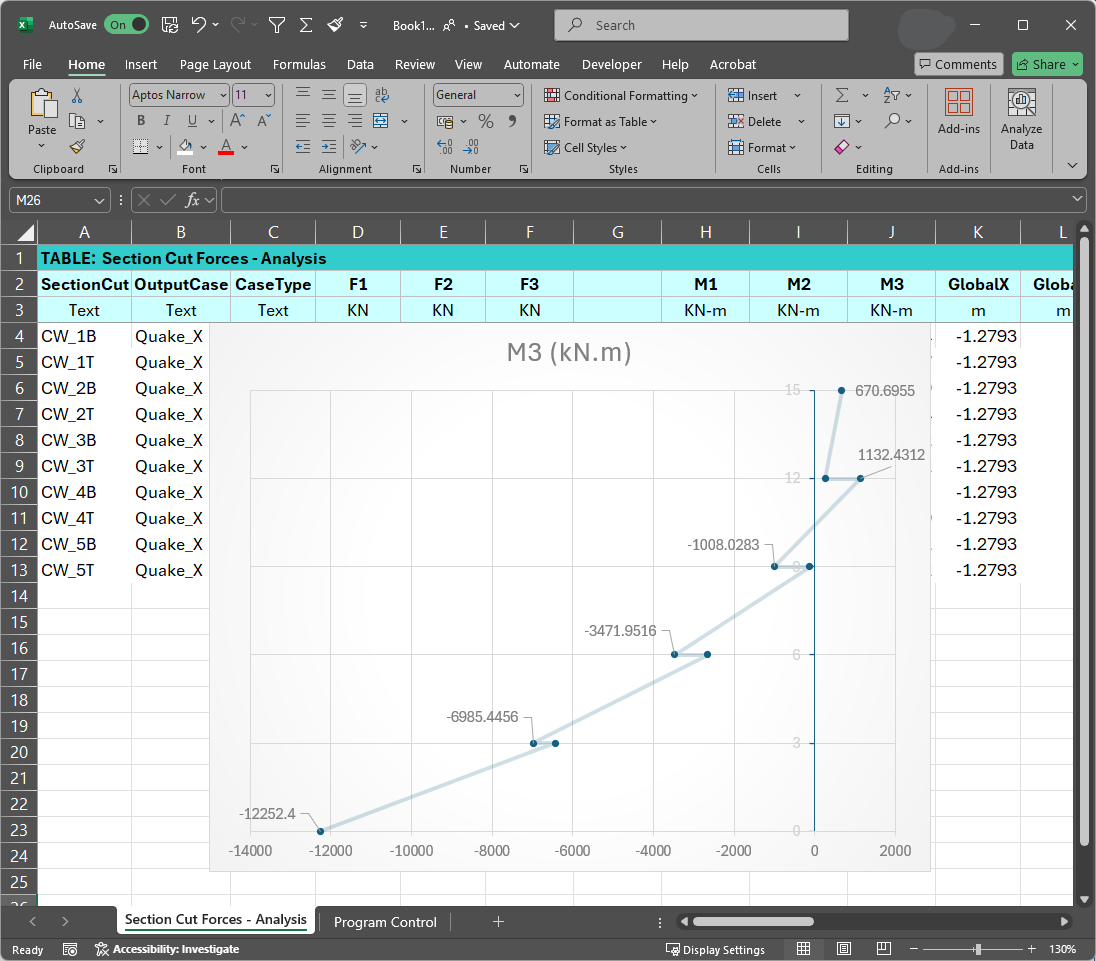
As noted earlier, ETABS automates this step by generating the core wall’s resultant bending moment diagram along its full height in a single operation, eliminating the need to define manual section cuts at multiple elevations.

Conclusion
Section cuts are a powerful and essential tool for any structural engineer using CSI software. They provide valuable insights into the internal forces of a structure, which is critical for safe and efficient design. By understanding how to define and use section cuts effectively, you can enhance your structural analysis and design capabilities. Whether you are a student, a beginner, or an experienced engineer, mastering the use of section cuts will undoubtedly make you a more proficient user of SAP2000, ETABS, and CSiBridge.