
Moving Loads in SAP2000
Analyzing structures subjected to moving loads is essential to ensure safety and efficiency in civil engineering projects, especially in bridges and viaducts. This article covers the key concepts and procedures related to moving loads in SAP2000, drawing on common practices and the software’s available features.
Definition of “Paths”
In SAP2000, a “Path” refers to the one-dimensional trajectory that a moving load follows. These paths are represented by frame elements in SAP2000, unlike in CSiBridge, which supports two-dimensional lanes. Accurate path definition is fundamental for realistic analysis.
Load application on a path can occur in two ways:
- Centered/Collinear with the bar element defining the path: Represents loads moving directly over the element’s axis of application.
- Eccentric: Involves a load transversely offset from the element defining the path. Positive offsets indicate the load is shifted to the right side of the bar, taking the view from the start to the end of the path. To ensure correct definition, it is recommended to use Display > Show Paths for a graphical overview of the trajectories.
Definition of Point and Distributed Moving Loads
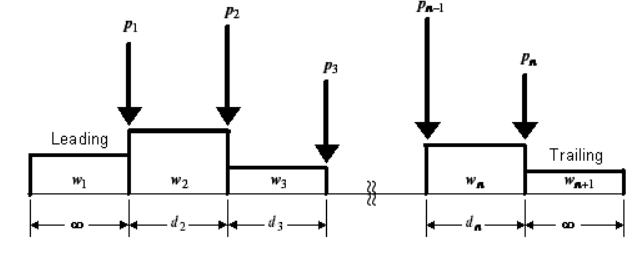
Load Length Type
- Leading Load: The load that precedes the vehicle.
- Trailing Load: The load that follows the vehicle.
- Fixed Length: A load with a constant length.
- Variable Length: A load whose length may vary.
Minimum and Maximum Distance
- Minimum and Maximum Distance: Define the minimum and maximum spacing between consecutive vehicle axles.
Note: The minimum distance value corresponds to the fixed length used in “Fixed Length,” and the maximum distance only applies to “Variable Length.” No more than one “Variable Length” can be added per vehicle.
Uniform Load
- Allows input of uniformly distributed load values, expressed in units of load per length (e.g., kN/m).
Axle Load
- Allows input of the total load applied on each vehicle axle.
Vehicle Remains Fully in Path
- Restricts movement so that the vehicle stays completely on the path. This is useful for specialized equipment such as overhead cranes.

In addition, moving loads are categorized into Vehicle Classes, which can include one or more vehicles for analysis. It is important to note that vehicles within the same class do not act simultaneously on the path. SAP2000 automatically generates one class for each defined vehicle, facilitating the analysis of different scenarios.
Influence-Line-Based Analysis
Influence-line analysis is a powerful technique for determining maximum and minimum structural responses under moving loads. In SAP2000, this involves:
- Automatic Vehicle Placement: Vehicles are placed along the paths to yield extreme responses in the structure.
- Response Calculation: Maximum and minimum values of each structural response are obtained by multiplying concentrated or distributed loads by the corresponding influence-line values; in the case of distributed loads, integration is performed over their length.
- Configuraciones de carga: By default, only load components that produce unfavorable effects are considered. However, users can enable “Allow loads to reduce response severity,” causing the software to account for the entire load, possibly reducing the structural response severity.
Analyses
SAP2000 offers different approaches to moving-load analysis:
- Moving Load Analysis: An influence-line-based approach. Users can restrict each vehicle class to certain paths or allow use of all. It is also possible to define minimum and maximum numbers of paths each vehicle class may occupy, as well as apply reduction factors that vary depending on the number of loaded paths. Based on these definitions/restrictions, the program automatically seeks vehicle placements on different paths that yield extreme responses.
- Multi-step Static Analysis: Evaluates the linear or nonlinear structural response over multiple static steps, considering each vehicle’s position, start time, direction, and speed. Limitations: When vehicles have distributed loads, Multi-step Static Analysis does not incorporate them.
-
Time-History Analysis: Accounts for dynamic effects of moving loads, offering a more realistic representation of structural behavior under dynamic or nonlinear loading conditions. This approach overcomes the limitations of a Multi-step Static Analysis by more accurately simulating the continuous, dynamic interaction of a vehicle’s distributed loads, providing a more comprehensive assessment of the structural response.
This flexibility allows engineers to choose the method best suited to the project’s specific requirements and the desired level of safety and performance.
Managing Output Results
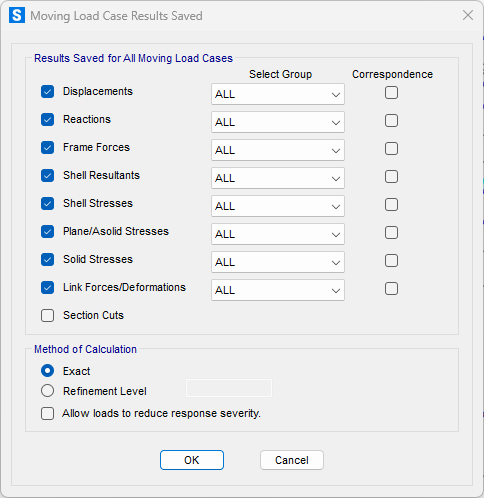
The Define - Moving Load Case Results Saved section in SAP2000 controls which information is calculated for joints and structural elements during the moving-load analysis. Key functionalities include:
- Response Category check boxes: Select categories of response to analyze (displacements, forces, stresses, reactions, etc.).
- Select Group drop-down list: Choose the group for which responses will be calculated (default is ALL). At least one group must be selected to obtain results.
- Correspondence check boxes: Use Max/Min Correspondence in the results. This can be computationally intensive, so it should only be enabled if needed
- Method of Calculation: Choose between Exact or Refinement Level, where higher levels improve accuracy but increase processing time.
- Allow loads to reduce response severity: By activating this option, the total value of both concentrated and uniform loads is applied across the entire influence line, even if it reduces the severity of the response. This method is less conservative than the default approach but can be advantageous for specialized vehicles with well-defined loads. For more uncertain or hypothetical loads, keeping the default method provides greater safety.
You can check a simple example of moving loads in Chapter 11 of the Basic - SAP2000 course.